
YouTube Video Recap: Get the Point Fast
YouTube Video Recap: Get the Point Fast

A YouTube video recap, in the sense that matters here, is an AI-generated summary of a single video that tells you what’s worth watching and what you can skip. The fastest way to get one: install Baitless, a Chrome extension that generates one-click summaries with 25 free credits included, no credit card required.
Key Takeaways
AI-generated YouTube video recaps save real time and, in controlled studies, improve learning outcomes when used alongside the original video.
| Point | Details |
|---|---|
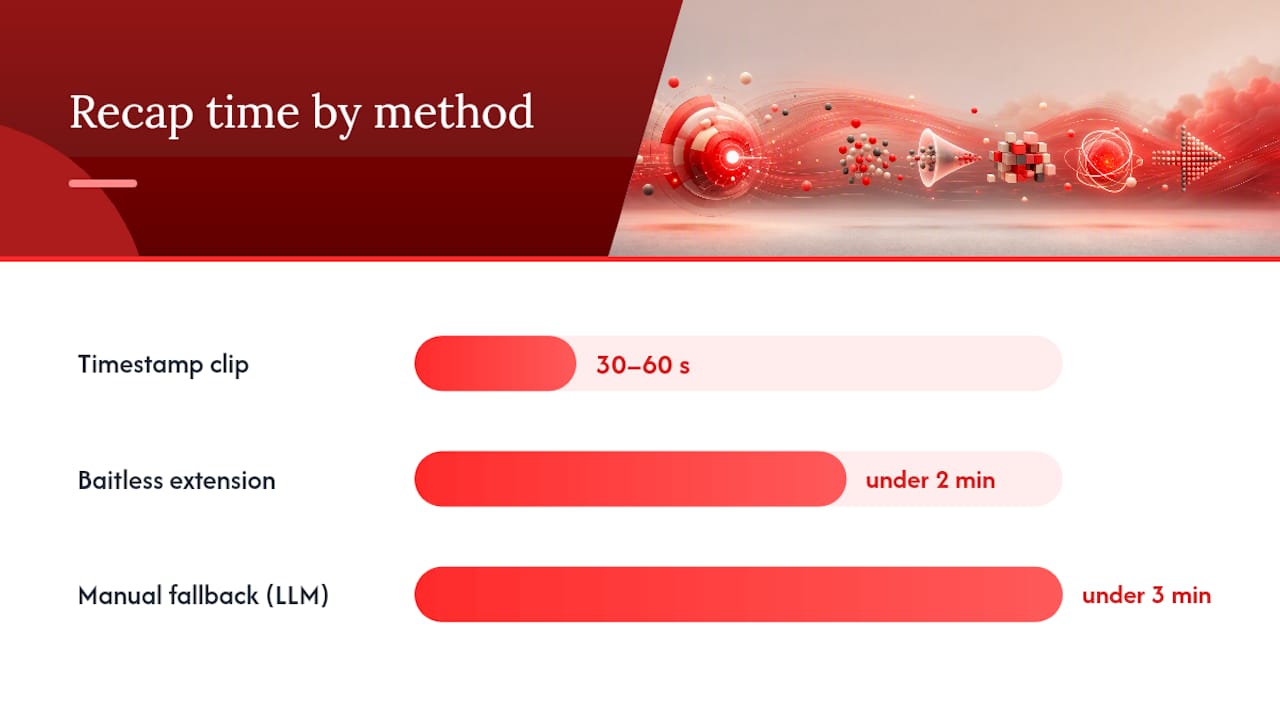
| Get a recap in under two minutes | Install Baitless, open a YouTube video, and click “Summarize” for an instant side-panel summary. |
| Pipeline quality drives accuracy | ASR errors propagate through the transcript to the LLM; videos with manual captions produce better recaps. |
| Verify technical claims at the timestamp | Always check specific numbers, quotes, or methods against the original video segment before using them. |
| Privacy check before installing | Confirm what the extension sends to servers, how long data is retained, and whether a local mode exists. |
| Baitless free credits | Baitless includes a free allocation of summary credits with no payment required, enough to evaluate it for your workflow. |
Table of Contents
- How does a YouTube video recap actually get made?
- What does the research say about video summaries and learning?
- How to get a YouTube video recap in under two minutes
- Why recaps aren’t always accurate and how to fix that
- What does a recap extension actually send to servers?
- What does a YouTube recap tool typically cost?
- Practical workflows for professionals, students, and researchers
- Why I recommend this approach for time-pressed viewers
- Baitless gives you the point before YouTube takes your afternoon
- Sources
How does a YouTube video recap actually get made?
Every automated recap runs through the same basic pipeline, even when the interface hides the steps. Understanding it helps you predict when a summary will be sharp and when it will miss.
The core pipeline:
- Audio extraction: The extension or service pulls the audio track or, more commonly, the existing YouTube caption file from the video.
- ASR (Automatic Speech Recognition): If no caption file exists, a speech-to-text model transcribes the audio. This is where most errors enter.
- Transcript cleaning: Filler words, timestamps, and speaker labels are normalized before the text reaches the language model.
- LLM summarization: A large language model reads the cleaned transcript and generates a condensed summary, often with key points and timestamps.
- Formatting and timestamping: The output is structured into a readable format, with clickable timestamps linking back to the source video.
Open-source extensions like Magpie demonstrate this architecture clearly: a content script extracts captions, a background worker calls an LLM API, and the UI renders markdown with caching per video and prompt to avoid redundant API calls.
Modular pipeline vs. end-to-end multimodal models: A modular pipeline, where each step is a separate component, makes it easier to isolate which stage caused an error. If the transcript looks garbled, the problem is in ASR, not the LLM. End-to-end multimodal models process video directly but mask intermediate failures, making quality harder to diagnose or improve. For most YouTube recap use cases, the modular approach wins on transparency and reliability.
Common failure modes:
- Heavy accents, fast speech, or overlapping speakers degrade ASR accuracy significantly.
- Technical jargon or domain-specific terms get transcribed incorrectly and then summarized incorrectly.
- LLM hallucination: the model fills gaps in a poor transcript with plausible-sounding but wrong content.
- Very long videos can exceed a model’s context window, causing the summary to drop content from the middle.
Pro Tip: If a video has manually uploaded captions (check the CC button), use a URL-based recap tool rather than uploading audio. Clean captions skip the ASR step entirely and produce noticeably better summaries.
What does the research say about video summaries and learning?
The evidence for AI-generated video summaries is more concrete than most people expect. A 2023 study published in the ACL Anthology found that automatically generated summaries of lecture videos improved student quiz performance and were preferred by students studying under time pressure. That’s not a soft preference signal; it’s a measurable outcome in a controlled setting.
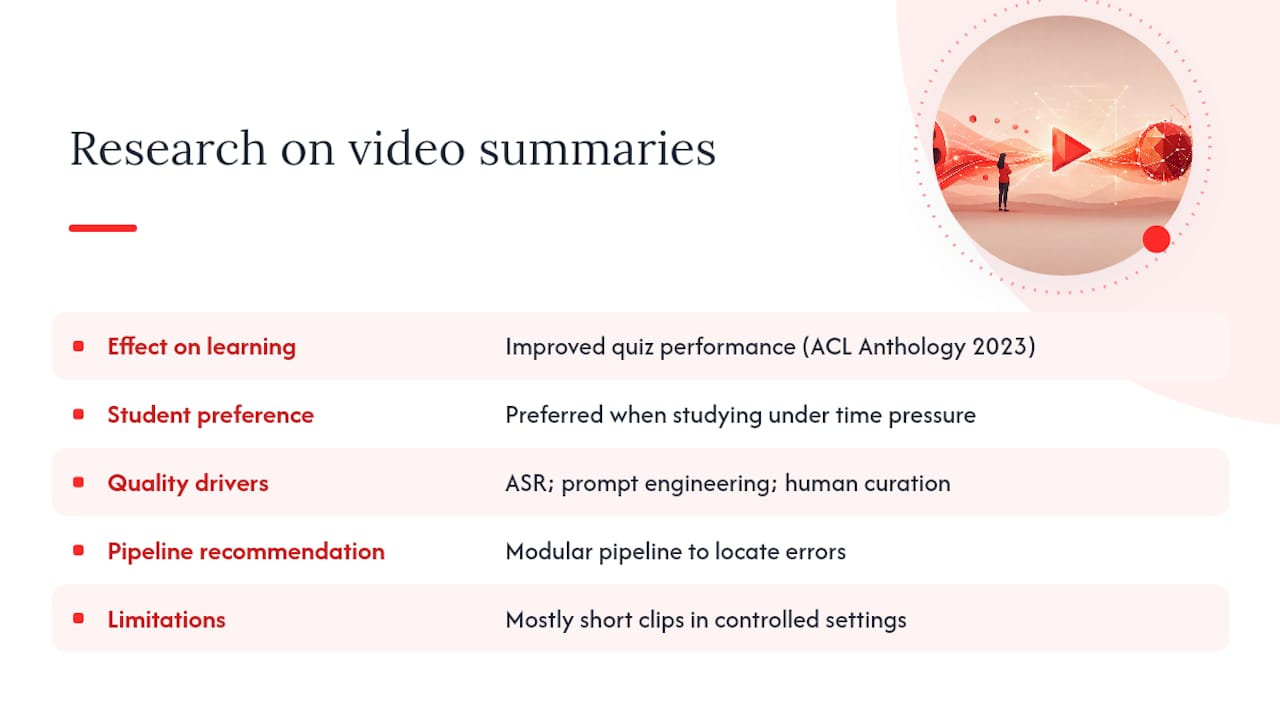
A Springer study on AI-based abstractive summarization reinforces the practical side: AI models can produce coherent, valuable summaries of recorded lectures, but the quality depends directly on ASR accuracy, prompt engineering, and whether a human curator reviews the output. The study recommends a modular pipeline precisely because it surfaces which component is causing errors.
There’s also an accessibility angle worth noting. Summaries give viewers an additional means of engaging with content, which aligns with Universal Design for Learning principles. For viewers with hearing impairments or those watching in a second language, a written recap of video highlights can be the difference between accessing content and skipping it entirely.
The honest caveat: most studies use relatively short clips and controlled conditions. Real-world YouTube videos vary enormously in audio quality and speaker clarity, so treat these findings as a strong directional signal rather than a guarantee.
How to get a YouTube video recap in under two minutes
The fast path takes less time than reading this section.
- Go to the Baitless website and install the Chrome extension.
- Open any YouTube video.
- Click the Baitless icon in your browser toolbar.
- Hit “Summarize.” The recap appears in a side panel within seconds.
- Read the key points or click a timestamp to jump directly to the relevant segment.
Manual fallback (for videos without captions or when you need a cleaned transcript): Use a YouTube transcript extractor to pull the caption file, paste it into your preferred LLM with a prompt like “Summarize this in five bullet points with timestamps,” and you have a usable recap in under three minutes.
Extensions like Glim also support topic detection, question generation, and HTML export, which is useful when you want more than a flat summary.
Pro Tip: Once you have a recap, use the timestamp links to jump to the 30–60 second clip containing the specific claim you care about. You get the context without scrubbing through the whole video.
Why recaps aren’t always accurate and how to fix that
No recap tool gets everything right, and knowing where errors come from helps you catch them before they matter.
The most common failure chain: poor audio quality degrades ASR output, which introduces errors into the transcript, which the LLM then summarizes confidently and incorrectly. The model doesn’t flag uncertainty; it just produces fluent text. That’s the hallucination problem in practice.
Jargon is a specific vulnerability. A medical lecture, a legal discussion, or a highly technical tutorial will trip up general-purpose ASR models on terminology. The transcript might read “hypertension” as “high tension” or miss a product name entirely.
Practical fixes:
- Prefer videos with manually uploaded captions (the CC icon shows a filled rectangle when captions are human-authored).
- If the recap misses key terms, paste a cleaned transcript directly into the summarizer rather than relying on auto-extracted audio.
- For any technical claim, quoted statistic, or specific number in a recap, verify it against the original timestamp before using it.
Pro Tip: Ask your summarizer to include exact timestamps next to any specific claim or quoted figure. That way, verification takes ten seconds instead of rewatching the whole video.
What does a recap extension actually send to servers?
Chrome extensions that summarize YouTube videos typically request a small set of permissions, and each one has a clear purpose.
- activeTab: Lets the extension read the current tab’s URL and page content, which is how it identifies the video and extracts captions.
- storage: Saves your settings and caches previous summaries so the extension doesn’t call the API again for a video you’ve already summarized.
- Host permission for youtube.com: Allows the content script to run on YouTube pages specifically.
What gets sent to external servers varies by tool. Most extensions send only the transcript text to an LLM API, not the raw audio. That’s a meaningful distinction: a transcript of a business meeting is sensitive, but it’s far less data than a full audio file. Some tools process everything locally, which eliminates the server-side risk entirely.
Practical privacy checks before installing any extension:
- Read the privacy policy for data retention periods.
- Check whether the extension offers a local-only or offline mode.
- Look at the permissions list in the Chrome Web Store before installing.
Pro Tip: If you’re summarizing a video that contains confidential information, use a transcript extractor to pull the caption file, redact the sensitive parts manually, then paste the cleaned text into an LLM. No audio ever leaves your machine.
What does a YouTube recap tool typically cost?
Most recap tools follow one of three pricing shapes, and knowing which you’re dealing with helps you avoid paying for more than you need.
- Free credits: A fixed number of summaries at no cost, typically 25, to let you evaluate the tool before committing. Baitless offers exactly this: 25 free summary credits with no payment required upfront.
- Pay-per-summary: Credits you purchase in batches, useful for occasional users who don’t need a monthly plan.
- Monthly subscription: Unlimited or high-volume summaries for a flat monthly fee, aimed at daily users, researchers, or teams.
When the free tier is enough: If you’re summarizing a handful of videos per week for a specific project or research sprint, 25 credits covers a meaningful trial. When you’re using recaps as a daily workflow tool, a subscription pays for itself quickly in time saved.
Quick estimate: count how many YouTube videos you watch per week where a summary would change your decision to watch or skip. If that number is above five, a subscription is worth considering.
Practical workflows for professionals, students, and researchers
Professional meeting prep (20–40 minute talk):
- Paste the conference talk or webinar URL into Baitless.
- Read the five-point summary to confirm relevance.
- Jump to the timestamp covering the methodology or recommendation section.
- Copy the key points into your meeting notes.
- Share the timestamped link with colleagues who need the same context.
Student study flow:
- Generate a recap of the lecture video.
- Use the structured summary to identify the three to five core concepts.
- Convert each concept into a flashcard using the format: question on one side, timestamp-linked answer on the other. AI video summarization tools support exactly this pipeline, from transcript to hierarchical notes to flashcards.
- Review flashcards before the exam; click timestamps to revisit anything unclear.
Researcher literature triage:
- Run recaps on five to ten videos covering a topic.
- Scan summaries for methodology keywords and specific claims.
- Flag videos where the summary mentions a relevant dataset or finding.
- Verify flagged claims at the exact timestamp before citing.
Content curator workflow:
- Generate a recap and scan for the strongest three moments.
- Use timestamps to clip those segments for a highlights reel or newsletter.
- Export the summary as text for a written content overview.
Why I recommend this approach for time-pressed viewers
The conventional wisdom around AI summaries tends to split into two camps: enthusiasts who treat every recap as gospel, and skeptics who dismiss them as unreliable. Both miss the practical middle ground.
The research is clear that summaries help, especially under time pressure. The ACL 2023 findings and the Springer analysis both point in the same direction: AI-generated summaries are genuinely useful when you treat them as a first pass, not a final answer. The failure mode isn’t the tool; it’s using a recap to replace watching when the stakes are high enough to require verification.
For a busy professional deciding whether a 45-minute conference talk is worth their afternoon, a recap is exactly the right filter. For a student building flashcards, it’s a time multiplier. For a researcher triaging ten videos, it’s the only scalable approach. The human-in-the-loop step, checking timestamps for anything you’ll actually act on, takes thirty seconds and eliminates most of the risk.
Baitless gives you the point before YouTube takes your afternoon
Most viewers waste the first ten minutes of a video just figuring out whether it’s worth watching. Baitless cuts that to ten seconds. Install the Chrome extension, open any YouTube video, and get a concise summary with timestamp links showing exactly where the key moments are. The free tier includes 25 summary credits, no payment required, so you can test it across a full week of your normal viewing before deciding whether to upgrade.

Heavy users get a subscription that covers daily use across research, study, and professional workflows. Baitless and run your first recap before you finish reading this page.
Sources
The claims in this article draw from peer-reviewed research, open-source extension documentation, and the Baitless product page.
- Making Lectures Accessible: AI-Based Abstractive Summarisation for Video Content | Technology, Knowledge and Learning | Springer Nature
- Automatically Generated Summaries of Video Lectures May Enhance Students’ Learning Experience - ACL Anthology
- From Lecture to Flashcard: How AI Video Summarization Changes the Way Students Study | CuFlow
- fav83/magpie